 AESTAR
Every call
Ava answers all of them, day and night, as your shop.
For home-service shops, from HVAC to house cleaning
You don’t set this up. Ava does. Give her your website and she fills in your shop, your services and your prices for you to check. Forward your calls and she starts answering. We estimate about 10 minutes of your time, start to finish.
Call Ava Live:(480) 771-6324 Or hear her answer as your shopThe phone app
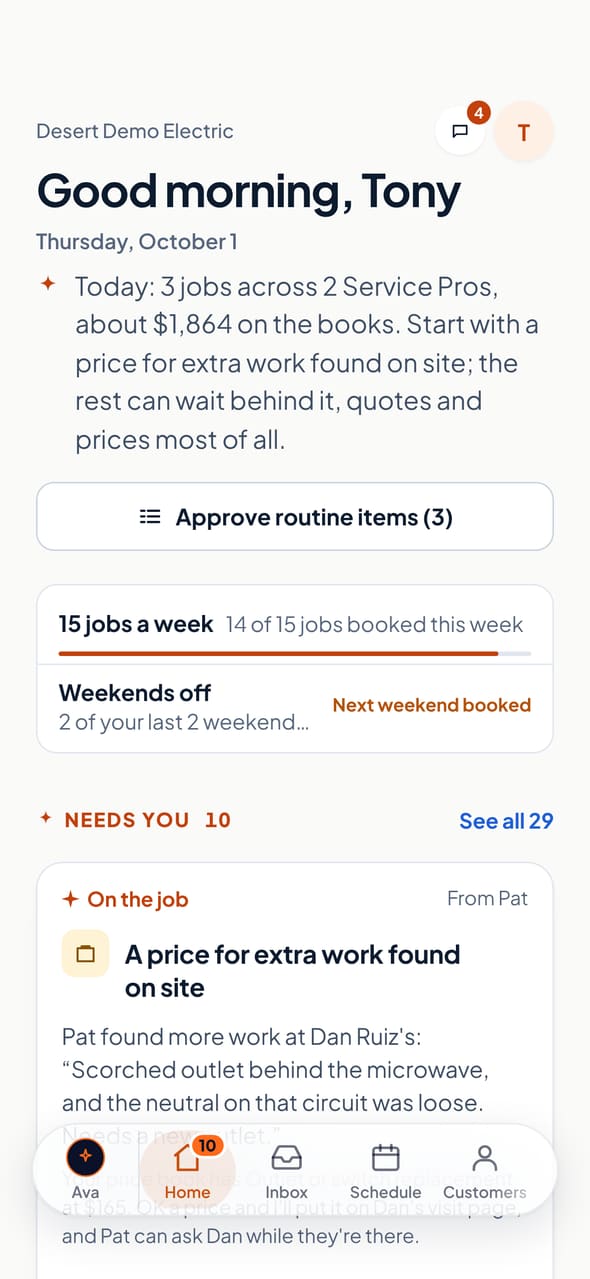
The same sample shop on a phone. Ava sits at the left of the bar, and every place in your shop is a swipe away. Tap one to see it, or tap Ava to watch her answer.
Home
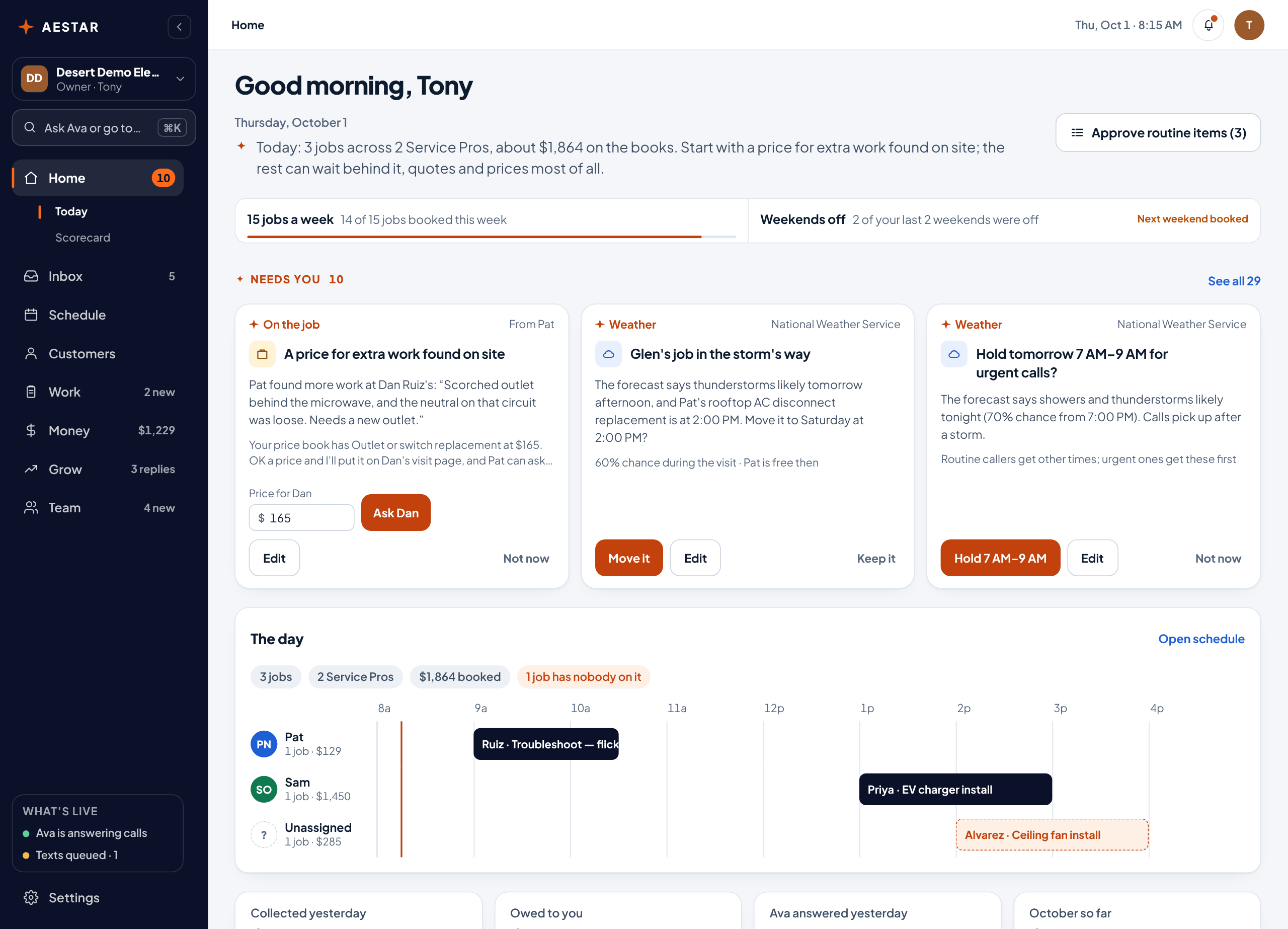
Ava sums up your day in a line. Then your goals, and what needs you as cards you answer right there.
Pictures of the sample shop in the phone app. The live app is the real one, on the sample shop: nothing you tap there calls, texts or charges anyone.
Watch Ava work
Example 1 of 8 · Electrical · 0:28
Maria's kitchen outlets went dead while you were on a job. Ava checks it's safe and books her for tomorrow at 1.
Calls. Every call answered, day and night.
Schedule & live map. The right Service Pro, on time.
Estimates. Price ranges from your price book.
Getting paid. Invoices and reminders until it's paid.
Customers & growth. Reviews, past customers and new work.
Service Pro app. Their day, with Ava riding along.
Ask Ava. Your day and your numbers, in sentences.
Setup. Ava sets up your shop.
Sample shops. The texts in these clips wait in a queue until your number is approved.
The demo shop
Desert Demo Electric is a sample shop with a full week of calls, jobs and money. Every page of the app is in its sidebar: pick one to see it here, then open the live demo to tap Confirm, move jobs and ask Ava.
Pictures of the sample shop, with every page in the app’s own sidebar in the phone app, one for each page above. The live demo is the full app: nothing you click there calls, texts or charges anyone.
The tour
Right after you sign up, Ava shows you around: what she did before you asked, what needs your yes, and how to ask her anything. Here it is on the sample shop. You’re Tony, the owner; tap his answers to keep going.
Pictures of the sample shop, in the app’s own sidebar in the phone app. The clips are the same ones in Watch Ava work.
Hear it for yourself
Give Ava your shop’s website. She reads it, learns your services and hours, and answers your phone the way she will on day one. When you hang up, she tells you what she did before you ask.
No shop handy?No website? Try , , , , or . Nothing is booked, sent or saved.
“Thanks for calling your shop, this is Ava, the shop’s AI assistant, and calls are recorded. What’s going on?”
Your phone line
When you go live, your shop gets its own Ava phone number, and there's no charge for the number. Your customers keep calling the number they know, and your phone company passes calls on to Ava's. You choose which calls she answers: every call, or only the ones you can't pick up, like when you're on a job, on another call or after hours.
Ava answers all of them, day and night, as your shop.
On a job or on another call, the call goes to Ava instead of voicemail.
When you're closed, the call goes to Ava instead of voicemail.
Change it any time. It's a forwarding setting with your phone company, and we walk you through it when you go live.
How it works
She fills in your shop, your hours and your services from your own website, with starter prices for your trade where your site doesn't name one.
Hand her the address. Then check what she found and change anything that's off.
Ava gets her own number, free. She books routine jobs into real open times.
Keep your number. Send her the calls you would miss, the after-hours ones, or all of them.
She puts a Service Pro on each booking, drafts quotes from your price book and lines up reminders for unpaid invoices.
You tap Confirm, or change it.
After the call
Follow a job from the phone ringing to the next job. Each stop is a part of Aestar, and all of them live in the same app.
More customers
Customers pick the shop that answers, has fresh reviews and shows its work. Aestar does that part for you from the day you sign up.
Calls you miss go to Ava, so the caller books with you instead of the next shop on the list.
Every customer who pays you is asked for a Google review on their receipt, and by text once carriers approve your shop. Every customer, never only the happy ones.
Your services, prices, hours and a request form, built from what Ava found when you signed up.
Ava writes it for Google, Facebook, Instagram and Nextdoor, with no customer names. Posting them for you is next.
Your goals
Say a goal in your own words: “$45,000 a month”, “weekends off”, “100 Google reviews”. She says it back with her plan, and where you stand sits at the top of Today, counted from your own invoices, schedule and reviews. Nothing is set until you say yes.
Billed $30,700 so far this month, on pace for about $43,900.
3 of your last 4 weekends were off. Next weekend is clear.
82 of 100 reviews. 18 to go.
Who it's for
Aestar is for shops that send someone out to do the work: 47 home-service trades, from HVAC and plumbing to roofing, pest control and house cleaning. Pick yours and Ava starts with what counts as urgent in that trade, and its starter prices for you to check.
An HVAC call
Caller · 2:30 PMOur AC is making a loud rattling noise. It's still cooling, though.
AvaThanks for catching it early. Since it's still cooling, I can book a diagnostic. The first opening is tomorrow at 8 AM.
CallerWhat does that cost?
AvaThe diagnostic is $89, and we'll quote any repair before starting. Want the 8 AM visit?
Call ends
A plumbing call
Caller · 9:48 AMMy kitchen sink is draining really slowly. It's gotten worse all week.
AvaSorry about that. Is any water backing up or overflowing right now?
CallerNo, it just drains slow.
AvaOkay. I can have a plumber there tomorrow at 10. Does that work?
Call ends
A electrical call
Caller · 10:05 AMMy kitchen lights flicker whenever the microwave runs.
AvaI can help. First — do you smell anything burning, or see any sparks or scorch marks?
CallerNo, nothing like that.
AvaGood. An electrician can take a look tomorrow at 10. Does that work?
Call ends
A handyman call
Caller · 10:10 AMI've got a few things — a sticky door, two shelves to hang, and a dripping faucet.
AvaI can book those together. That sounds like about half a day, and our rate starts at $95 an hour. I have Thursday morning open — want it?
CallerThursday works.
AvaYou're booked for Thursday at 8. I've listed all three jobs so whoever comes brings what they need.
Pricing
Every plan has all of Aestar and every Service Pro. No per-seat fees, no contract. Going live starts a 30-day free trial with a card on file; cancel any time.
$89 / month / mo
200 answered minutes, then $0.25 a minute
Setup normally $299 free until November 1
200 minutes, then $0.25 a minute · setup normally $299 free until November 1
$199 / month / mo
600 answered minutes, then $0.20 a minute
One-time setup with our team
600 minutes, then $0.20 · we set it up with you
Talk to us$349 / month / mo
1,500 answered minutes, then $0.15 a minute
One-time setup, done for you
1,500 minutes, then $0.15 · we do it all for you
Talk to usQuestions
Still have a question? Ask, or hear Ava answer a real call at (480) 771-6324.
Yes. Ava says she's the shop's AI assistant at the start of every call, and that calls may be recorded. Most callers just want to get booked, and Ava makes that quick.
Yes. Your number stays yours, and Ava gets her own number, with no charge for it. You choose which calls go to her: every call, or only the ones you can't pick up (on a job, on another call or after hours) instead of voicemail. It's a forwarding setting with your phone carrier, and you can change it any time.
If a caller mentions a gas or burning smell, smoke, sparks, a carbon-monoxide alarm or anyone hurt, Ava tells them to hang up and call 911 first. Other urgent calls — a leak, no cooling, no power — are marked urgent with the address and a callback number so your team can call right back.
Not until the carriers approve your shop's number. Until then Ava writes them and they wait, marked Queued, and nothing goes out.
You're in charge. Ava asks before anything reaches a customer, and you can switch any step off.