Texts only with a lawful basis. STOP always works.
Effective July 17, 2026. Updated October 2, 2026. Aestar sends texts through Twilio, and only to people who agreed to them. An owner turning Aestar on is not consent from that owner's customers.
This page is Aestar's public SMS and A2P notice. It is not a 10DLC certificate for any shop.
Who this covers
Aestar AI Solutions is operated by Profacio, LLC. This page explains how we treat US application-to-person (A2P) SMS when a shop uses Aestar to message that shop's own customers. It restates the SMS, TCPA, and consent rules already in our Privacy Policy (effective July 17, 2026) and Terms of Service (effective July 29, 2026). It does not replace those documents.
What this page covers
This is Aestar's public SMS and A2P 10DLC notice. It sits next to Privacy and Terms on every marketing footer. It is not a carrier registration certificate and it does not claim a shop is already 10DLC-approved.
Consent
We only send automated texts on a shop's behalf after that shop has a lawful basis to reach the person. Recipients can opt out at any time. Consent to receive texts is not a condition of purchase. We do not use purchased or cold lists.
Reply STOP to opt out. That opt-out applies across every Aestar sender for that number.
Reply HELP for help. Message frequency varies. Message and data rates may apply.
Owner authorization is not consumer consent.
Consent must match the kind of message. A booking confirmation is not permission for a marketing campaign.
How people agree to texts
Nobody is signed up for texts by sending a request, booking a visit, or calling. A person agrees only by ticking a box. The box is optional, it starts unticked, and everything works without it.
Homeowners, on a shop's website page
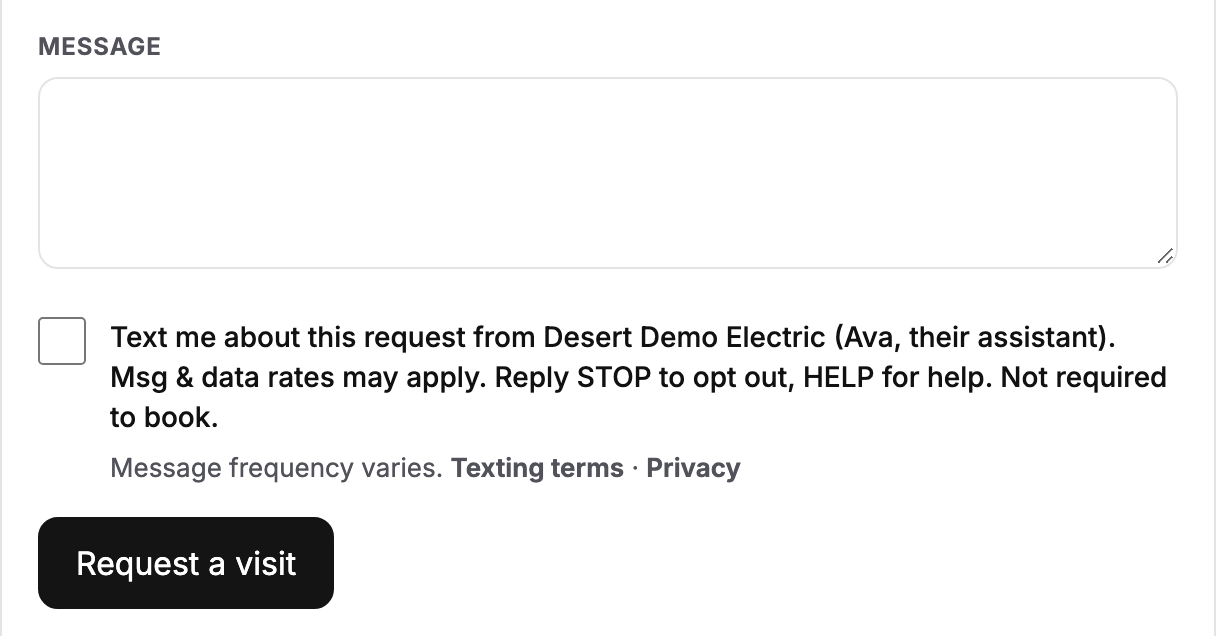
On a shop's Aestar-built page (aestarai.com/s/ followed by the shop's name), the request form, the callback form in the chat, and online booking each show this box, unticked:
Text me about this request from [Shop name] (Ava, their assistant). Msg & data rates may apply. Reply STOP to opt out, HELP for help. Not required to book.
A tick needs a phone number on the form. We keep the tick with the request or booking: that it was ticked, the date and time, which form, and which version of the wording was on screen. We do not keep an IP address or browser details with it.
The box on a shop's request form (a sample shop). Booking and requests work with it unticked.
Shop owners, on Aestar's sign-up
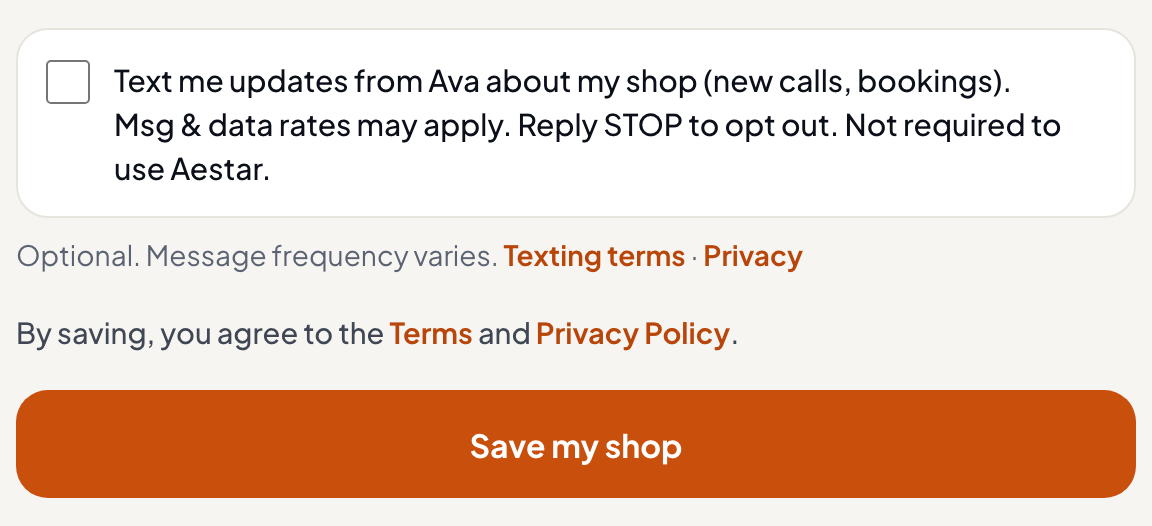
When a shop owner signs up at aestarai.com/onboarding, the account step shows this box, unticked. Ticking it asks for a mobile number to send updates to:
Text me updates from Ava about my shop (new calls, bookings). Msg & data rates may apply. Reply STOP to opt out. Not required to use Aestar.
The box on Aestar's sign-up. Signing up works with it unticked.
What the texts are, and when they start
Texts are about the request or visit the person made, such as a booking confirmation, a reminder, or an update on the visit. They are not marketing. Message frequency varies.
Reply STOP at any time to opt out, or HELP for help. Message and data rates may apply. You can also email hello@aestarai.com.
Texts to a shop's customers wait in a queue and are not sent until the carrier approves that shop's number. Ticking a box today does not make a text go out.
STOP, unsubscribe, cancel, and end opt a number out across every Aestar sender for that shop. Once someone opts out, later campaigns and follow-ups must honor it. HELP replies with the shop identity and how to get support. Recipients can also email hello@aestarai.com or privacy@aestarai.com.
A2P 10DLC
Carrier 10DLC brand and campaign registration is shop-specific. Until a shop's campaign is approved, texts to that shop's customers wait in a queue and are not sent. The app says so plainly: a text that is waiting is shown as waiting, never as sent. We do not claim that publishing this notice, connecting a phone number, or completing onboarding registers a shop with The Campaign Registry or any carrier.
What shops must do
If you use Aestar to contact your customers by text, you represent that you have the legal right and any required consent to contact them. You are responsible for TCPA, CAN-SPAM, carrier rules, and applicable law. We provide opt-out handling and consent records; the underlying relationship and permission are yours.
Collect and keep proof of consumer consent before asking Aestar to text a customer for marketing or follow-up.
Do not upload purchased, rented, or cold-acquired contact lists.
CRM imports never trigger automatic outbound campaigns.
Honor STOP immediately. Do not ask Aestar to override an opt-out or treat an inbound job request as a reset.
What Aestar checks before any text
Before any marketing or follow-up text, Aestar checks that the person has agreed to it and has not opted out. Ava and Aestar's other assistants cannot assume someone agreed. A drafted text is not a sent text: if a check says no, nothing is sent. Twilio is the messaging provider.
What Aestar will not do
We will not infer consent from a call, a website visit, or a photo-drop quote request. We will not bypass quiet hours, frequency caps, or STOP handling. Send stays off until a human approves live messaging for that shop. Provider errors or a failed check mean we do not send.
How do I stop texts?
Reply STOP to any Aestar text. HELP gets a short help reply. Opting out applies across all senders.
Does turning on Aestar let you text my customers?
No. You still need a lawful basis and any required consent. Aestar keeps opt-out and consent records; the underlying permission is yours.
Am I signed up for texts when I send a request or book a visit?
No. You are only signed up if you tick the optional box on the form. Booking and requests work without it.
Is my shop 10DLC-registered because this page exists?
No. Registration is a per-shop carrier step. This page explains the rules. It does not claim your campaign is live.
Who do I contact about SMS or this notice?
Email hello@aestarai.com or privacy@aestarai.com. The full Privacy Policy is at /privacy and the Terms of Service are at /terms.